PROPOSED PROJECT
Archive Clip Finder
Find moments in a production archive by spoken line, person, scene, or action. Return previews at the right video timestamp, show usage permissions, and let editors export a list of selected clips linked to the original files.
The right moment. Not just a similar frame.
Query + visual evidence
Original file + source time range
“Empty platform at night, train leaving, no people.”
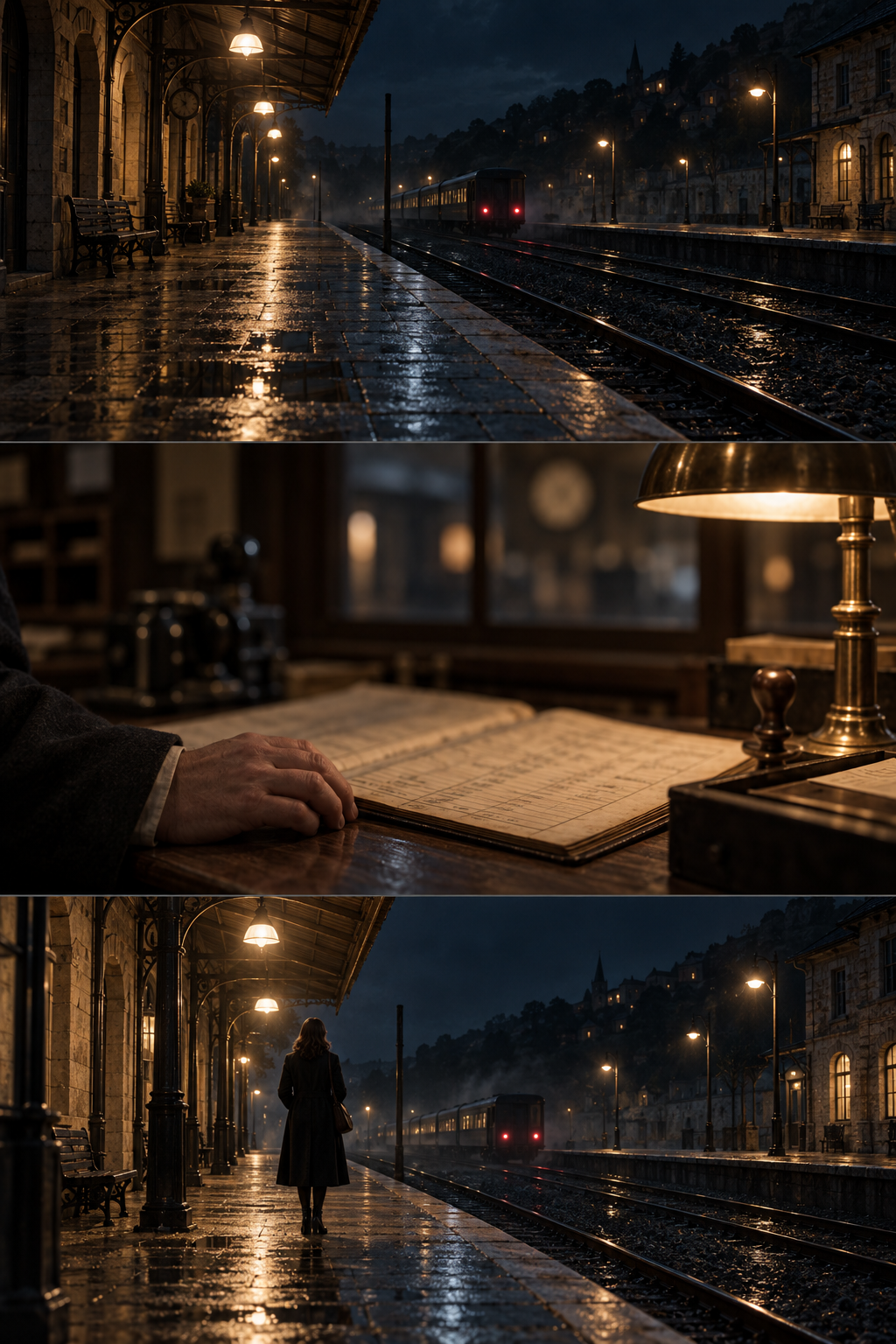
The empty platform
Empty night platform matches the requested setting. Verify the train’s movement through the source interval.
00:02:10:00 → 00:02:20:00The waiting traveler
Similar location and lighting, but a traveler is in the frame. It fails the no-people condition.
00:31:20:00 → 00:31:36:00The ledger
This is an indoor ledger close-up, not an empty platform.
00:14:08:00 → 00:14:20:00Search the meaning.
Keep the original file.
An editor searches a fictional archive for “empty platform at night, train leaving, no people.” N01 is the candidate to review at source 00:02:10:00–00:02:20:00. N03 looks similar but includes a traveler, so it fails the no-people condition. N02 is an indoor ledger close-up and is also rejected. The candidate carries supplied permission reference P-11, still awaiting review for the intended use. The generated stills illustrate the source moments; no real search or video analysis ran.
WHAT IS USUALLY DONE
An editor browses folders and contact sheets or searches filenames that describe the shoot rather than the needed moment. Transcripts miss silent action, while visually similar shots may include an unwanted person. A useful selection then needs to be traced back to the original file and its permission record.
WHAT SOVRUN CAN DO FOR YOU
Sovrun would build archive search across approved footage, time-aligned speech, visual descriptions, and supplied metadata. Editors can describe an action, search a spoken line, or use a person label that the team has verified. Results show the matching video moment, why it was returned, the original file and time range, and the supplied usage status. Editors review the candidates and export a selected-clip list that links back to the source media.
A selection the editor
can actually reconnect.
A result is useful only if it opens the correct source moment. The selected interval keeps its original filename, frame rate, permission reference, and review status. It is never replaced by a plausible generated shot.
One original source.
LD_N01_PLATFORM.mov
- Source in
- 00:02:10:00
- Source out
- 00:02:20:00
- Duration
- 10 seconds / 240 frames
- Frame rate
- 24 fps
- Permission reference
- P-11
- Release decision
- Pending review
Out-point is exclusive. Original media remains unchanged. The editor verifies motion and boundaries before using the interval.
From an editor’s request
to a usable source selection.
The proposed build covers a permitted archive sample, the team’s search vocabulary, and its editing software. The expected outputs are visible and reviewable; no search speed or match accuracy is invented.
Empty platform visible.
Train movement needs review.
The source stays attached.
- Clip
- N01
- Interval
- 00:02:10 → 00:02:20
- Permission
- P-11
- Use status
- Review pending
Reopen the exact moment.
Keep the query, selection notes, and permission review beside the source reference.
How we’d make it happen.
Prepare the archive for search
Read permitted source media, transcripts, and metadata. Preserve original paths and timing, and connect supplied permission records without guessing missing values.
Find and check the actual moment
Combine spoken-line and visual search, then show candidate intervals with the reason for each match. Editors verify the whole interval and reject near matches.
Hand off the selected sources
Save approved selections with exact in and out points, notes, and usage status. Export the list in the agreed editor format and verify that it reconnects to the originals.
Where AI helps
Multimodal retrieval combines transcript matches with video-frame descriptions and supplied metadata, then ranks candidates against the requested scene. Negative requirements such as “no people” are checked explicitly and uncertain matches remain suggestions. Person searches use team-verified labels or permitted reference matching with human confirmation; the system does not infer identity from an unlabeled face. Source timestamps and permissions come from the original records, not a generated description.
What people approve
Editors check that the requested action occurs through the selected interval, adjust clip boundaries, and confirm any named person against verified records. The archive owner sets access rules and the rights team checks the intended use. A relevant search result is not an approved publishing decision, and missing permission stays visible in exports.
What we’d need to start
- Permitted archive footage with stable original file paths, frame rates, and access rules
- Available transcripts, shoot metadata, team-verified person labels, and supplied permission records
- Example editor queries, intended uses, editing software requirements, and archive reviewers
How we’d test it
Use editor-labeled requests covering dialogue, silent action, verified people, and exclusions such as no crowd or no visible logo. Measure useful results near the top, missed moments, timestamp accuracy, and successful source reconnection. Test permission gaps and restricted files. Never fill a missing search result with invented footage or claim improved search speed without a timed comparison.
Prepared for Media & entertainment. We would agree on the work after reviewing your brief, materials, and requirements.
This is a proposed project, not completed client work. The visuals and numbers show example outputs, not measured results.