PROPOSED PROJECT
Product Films & Campaign Production
Build a campaign around your menu or product range for food lovers: a launch film, campaign photos, and files you can reuse, combining current AI tools with photography, editing, and 3D.
One product.
A connected campaign.
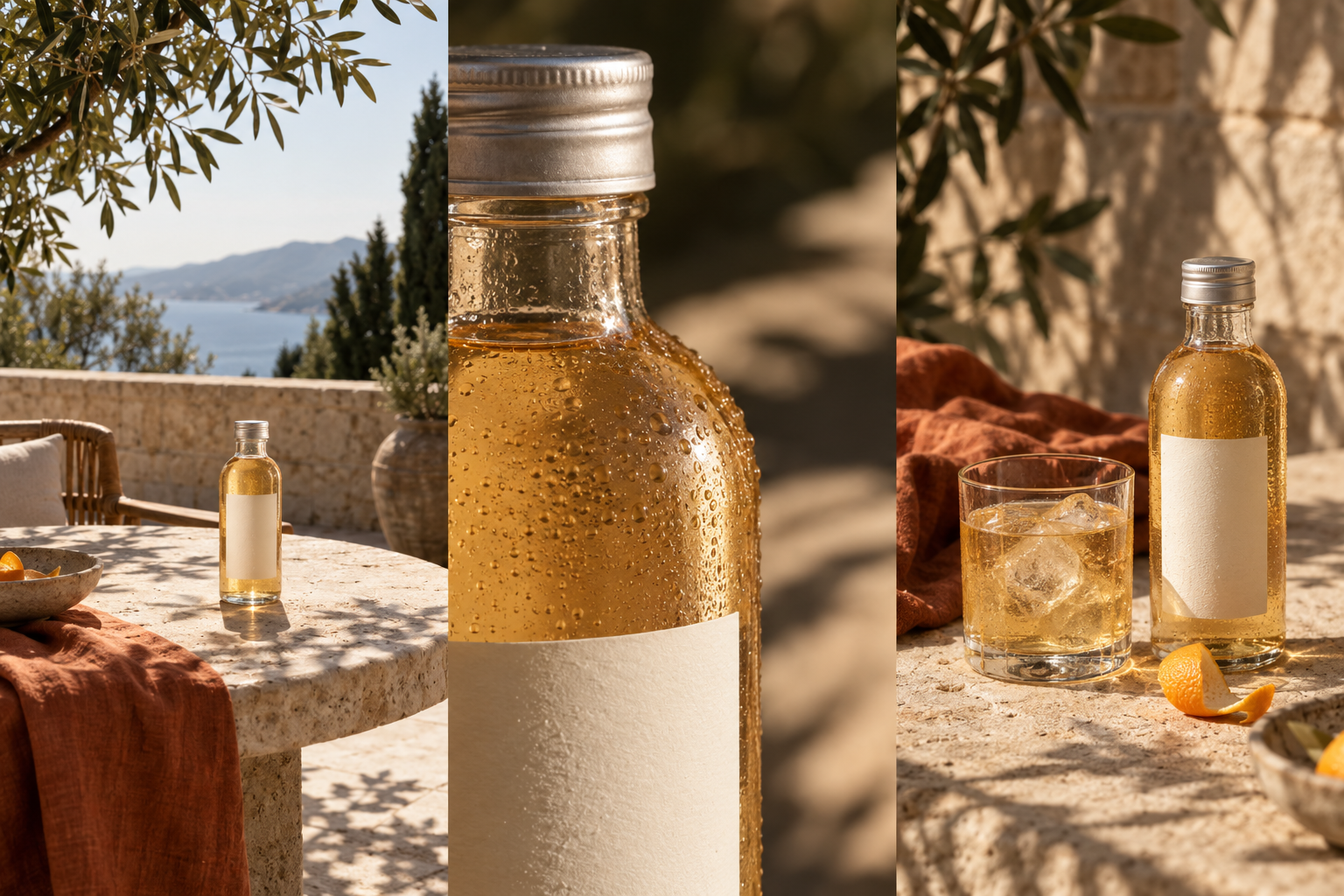
A bottled drink brand wants a summer launch film and campaign images. The proposed sequence reveals the bottle on a sunlit terrace, moves into glass and label detail, and finishes beside a serving glass. The illustrated bottle has a blank label; a commissioned project would use the brand’s approved bottle, artwork, liquid color, and serving guidance.
WHAT IS USUALLY DONE
A common AI workflow produces a polished product image, then crops it for each channel. New camera angles, motion, and revisions become separate generations, with product details and scene continuity checked again each time.
WHAT SOVRUN CAN DO FOR YOU
Sovrun would plan a campaign world around your menu or product range, showing the details that matter to food lovers. We would benchmark current image and video models on the hardest shot and build an approved reference kit before production. A proposed first engagement covers a 15-second film, six campaign images, and three ad formats. Photography or 3D preserves critical product details; shot records and editable image files make later revisions traceable.
Plan for the second request.
The next change should have a clear starting point. Keep product references, shot instructions, and editable files together so the team can revise one scene and check it against the others.
“Soften the opening leaf shadow. Keep the bottle shape, label position, drink color, and final serving scene.”
Rebuild the affected shot, then compare it with the next frame before approving the edit.
- The bottle and cap shape
- The approved label design
- The drink color and serving
Use approved photographs or 3D where an AI-generated frame changes a product detail.
What your team
would receive.
Proposed first project: a 15-second launch film, six campaign images, and versions for three ad formats. The boards below describe the planned delivery, not finished assets or measured results.
00–05sDetail
05–10sFinish
10–15s
Planned timing · final edit subject to review
Three concept frames shown above.
Separate layouts, checked before delivery.
How we’d make it happen.
Prove the difficult shot
Define the story, camera moves, and fixed product details. Compare current models using the same references and a demanding test shot before selecting the production workflow.
Build the sequence
Approve the keyframes, generate motion shot by shot, and composite product photography or 3D where precision matters. Correct drift and connect the shots in the edit.
Finish for launch and reuse
Retouch the stills, finish the film, and approve each placement. Deliver the exports with references, layered files, and shot records so the next update has a documented starting point.
Where AI helps
Reference-guided image models develop connected keyframes. Video models are tested for the camera movement and transitions each shot needs. Local edits refine selected areas, while combining generated scenes with approved photos or footage keeps approved product assets and typography under direct control.
What people approve
An art director approves the visual world and shot sequence. Compositors check product geometry, labels, reflections, and continuity frame by frame; an editor finishes timing, sound, and the final channel versions.
What we’d need to start
- Approved photography, footage, or 3D assets representing your menu or product range
- Material, design, and brand references
- Campaign brief for food lovers, priority placements across menus, delivery apps, in-store screens, and social, and usage rights
How we’d test it
Review product fidelity and continuity across the full sequence. Then test one real revision request: changing a camera move while retaining the approved product and scene. Record correction time, approval rounds, and accepted deliverables against the agreed brief; compare with the team's previous workflow where records exist.
Prepared for Food & beverage. We would agree on the work after reviewing your brief, materials, and requirements.
This is a proposed project, not completed client work. The visuals and numbers show example outputs, not measured results.