PROPOSED PROJECT
Vehicle Configurator
Let dealership customers describe the car they need, then compare valid model, paint, and accessory combinations. AI reads the request; product records control pricing and compatibility. Approved 3D models show the configured car alongside a draft quote.
Aster 5. Your version.
Draft for dealer review
“Five seats. Green paint. Roof bars.
Under ₱1.5m for the car and options.”
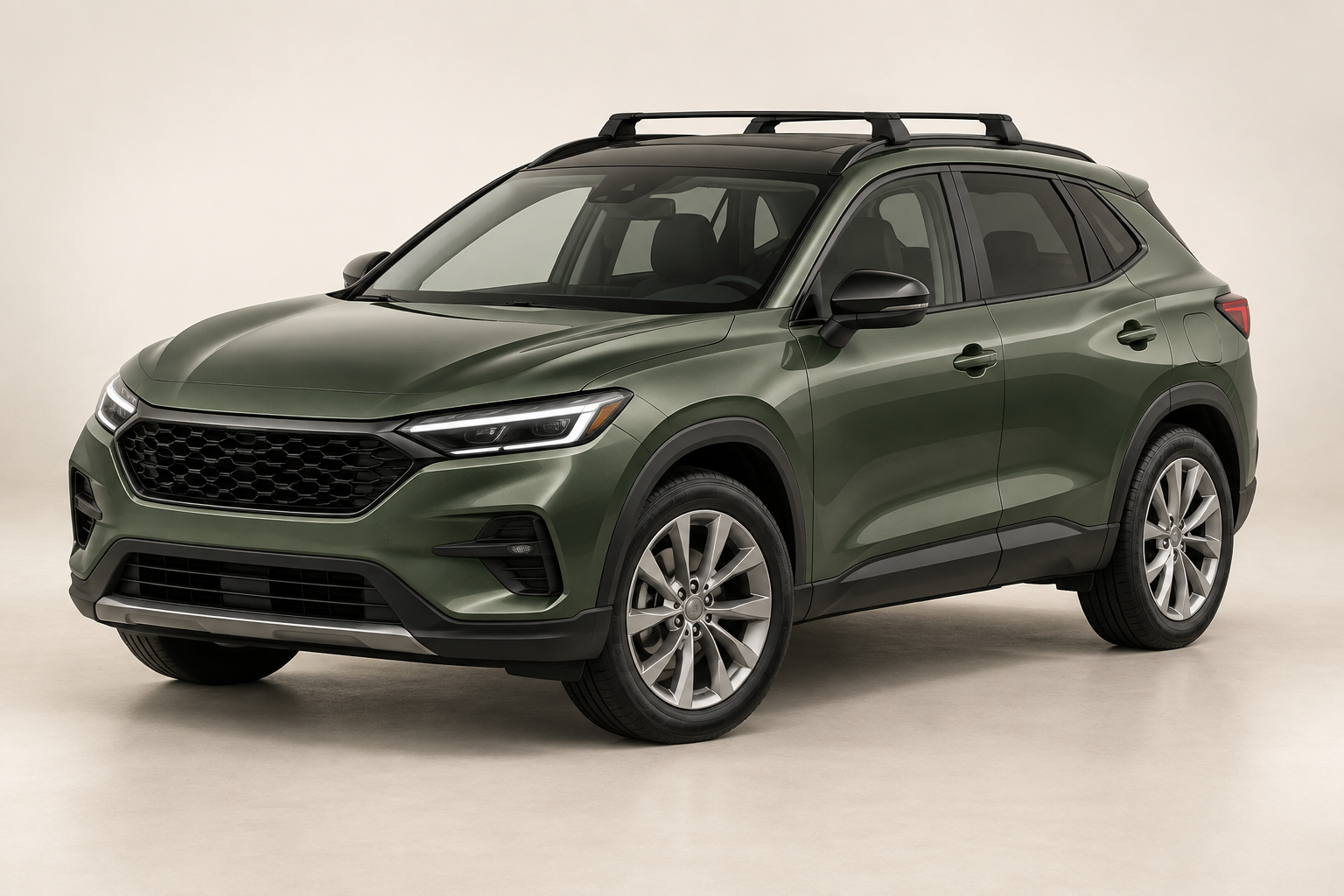
- Aster 5 / City
- ₱1,420,000
- Sage metallic paint
- ₱25,000
- Roof bars
- ₱18,000
Registration and insurance are outside this example. Stock and final charges still need dealer confirmation.
The picture and price
should describe the same car.
A fictional buyer asks for five seats, green paint, roof bars, and a vehicle-and-options budget under ₱1.5 million. The example catalog offers Aster 5 City at ₱1,420,000, Sage paint at ₱25,000, and compatible roof bars at ₱18,000. The configuration totals ₱1,463,000. Registration and insurance are outside this example; the dealer must confirm them before a final offer.
WHAT IS USUALLY DONE
A buyer describes what they want, then the salesperson checks a brochure, accessory list, and price sheet. An attractive render may show a combination the dealership cannot supply, and a price change can leave the picture and quote describing different cars.
WHAT SOVRUN CAN DO FOR YOU
Sovrun would build a guided configurator for one vehicle range. AI turns the buyer’s request into preferences to confirm; the dealer’s product records decide which combinations are valid. An approved 3D model displays the selected paint and accessories using those same product codes. The quote records every line, catalog version, and unresolved charge. The sales team reviews the configuration before sending an offer.
Every option
has to fit.
Use the same saved product codes for the vehicle view and the quote. An appealing request cannot override a compatibility rule or a budget limit.
Roof bars that fit City.
The example compatibility table permits R-02 with A5-CITY. Its price and matching 3D part both belong to catalog revision 12.
Compatible optionA tow bar for another trim.
T-09 is listed for Touring only. The tool leaves it out of the City configuration and shows why.
Not compatibleA model over the budget.
The example Touring base price is ₱1,580,000 before paint or accessories. It exceeds the buyer’s stated ₱1.5m limit.
Over the stated budgetA configuration
the dealer can pick up.
The proposed first build covers one vehicle range, its approved options, and the dealer’s quote format. The view and price remain linked when the buyer makes a change.
A5-CITY
- Paint
- P-SAGE
- Roof bars
- R-02
- Catalog
- Revision 12
₱1,463,000
- A5-CITY
- ₱1,420,000
- P-SAGE
- ₱25,000
- R-02
- ₱18,000
Vehicle and selected options only. Dealer review required.
What still needs checking.
- Vehicle and accessory stock
- Expected delivery date
- Registration and insurance
- Final offer approval
How we’d make it happen.
Make the product records agree
Match each model, color, and accessory code to its price, compatibility rule, and approved 3D part. Test invalid combinations before connecting natural-language requests.
Translate the buyer’s request
Extract preferences, ask about missing details, and return only valid combinations. Keep the visual, selected options, and quote tied to the same saved configuration.
Review the quote
Show the line items and source version. Recheck prices and stock after changes, then let the sales team approve the offer and any additional charges.
Where AI helps
A language model extracts needs such as seat count, color, accessory, and budget, then asks about ambiguous requests. Compatibility checks and price calculations run in code. The visual comes from approved 3D parts and materials, so a text model cannot invent an accessory or quietly change a vehicle specification.
What people approve
The dealership approves the product records, compatibility rules, 3D assets, and quote wording. A salesperson checks stock, delivery time, current prices, and charges outside the example scope before issuing an offer. A generated concept image is never the source of a technical specification.
What we’d need to start
- Approved model and trim records, current prices, and compatibility rules
- Licensed 3D vehicle and accessory files with paint references
- Quote template, stock source, included charges, and sales approval process
How we’d test it
Test valid and invalid accessory combinations, unavailable colors, a budget below the cheapest match, changed price sheets, and missing 3D parts. Compare every shown part and quoted line with its approved product code. Measure quote preparation time and corrections during a dealer-reviewed trial before claiming a saving.
Prepared for Automotive & mobility. We would agree on the work after reviewing your brief, materials, and requirements.
This is a proposed project, not completed client work. The visuals and numbers show example outputs, not measured results.